



 Github Stars:
 Last Commit:
  Created:

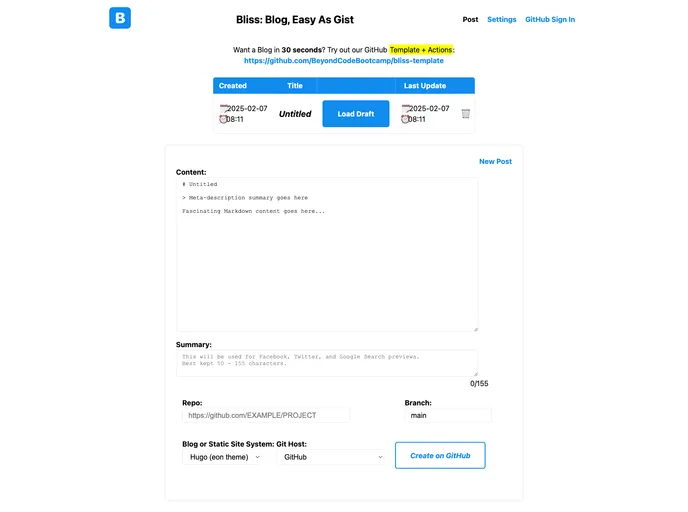
Overview
Bliss Template is a blog template that allows users to create a blog within seconds. It offers a range of features including zero configuration, web interface, CLI tools, support for local and remote building, and built-in edit links. With the template, users can easily customize and deploy their blog using GitHub Templates.
Features
- 0 Configuration: The config.yaml file automatically builds itself, eliminating the need for manual configuration.
- Dependency on GitHub: The template relies on GitHub for easy deployment with just a push-button action.
- Web interface and CLI tools: Bliss Template offers both a web interface (Bliss) and command-line tools (Hugo) for convenient blog management.
- Build at Home or Abroad: Users can choose to build their blog locally on localhost or remotely using GitHub Actions.
- Built-in Edit Links: The template includes built-in edit links for easy content editing.
Installation
To install the Bliss Template and create your blog, follow these steps:
- Go to GitHub Templates.
- Select and use the Bliss Template.
- Choose a name for your blog repository (e.g., blog).
- Wait for about 30 seconds for the deployment to complete.
- Check the new README.md file for further instructions.
- If the automatic configuration failed, open an issue for assistance.
To enable additional features and settings, follow the instructions provided in the new README.md file.
Summary
Bliss Template is a blog template that offers a quick and easy way to create a blog using GitHub. With its zero configuration, web interface, CLI tools, and support for local and remote building, users can customize and deploy their blog effortlessly. The template also includes built-in edit links for convenient content editing. By following the installation steps and instructions, users can create their blog within seconds and start sharing their thoughts and ideas.































