



 Github Stars:
 Last Commit:
  Created: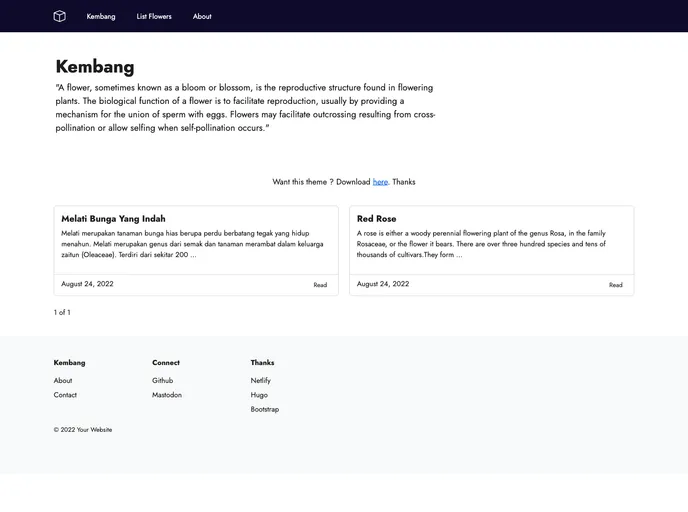
Overview
The Kembang theme is a responsive theme for websites that is built using Bootstrap CSS. It features easy customization, a high Lighthouse score, and uses local font Jost. The theme utilizes the Hugo framework and supports code highlighting using Chroma. It also includes the option to add a favicon to the website. The theme can be downloaded manually or cloned from the repository, and it is released under the MIT License.
Features
- Fully responsive
- Built with Bootstrap CSS only
- Includes About, Tags, and List pages
- Easy to customize
- Lighthouse score 100%
- Uses local font Jost
- Supports code highlighting using Chroma
- Includes option to add favicon
Installation
There are two ways to install the Kembang theme:
Manual Installation:
- Download the theme manually and extract it.
- Copy the “examplesite” folder and paste it into the “themes” directory of your Hugo site.
Clone the Repository:
- Navigate to the root directory of your Hugo site.
- Clone the Kembang theme repository.
- Refer to the Hugo documentation for more information on using themes.
Note: If you are manually installing Hugo, make sure to install the extended version. If you are using Debian/Ubuntu and installing Hugo from the repository, it will include libsass.
Summary
The Kembang theme is a responsive theme built using Bootstrap CSS. It offers easy customization and has a high Lighthouse score. It supports code highlighting using Chroma and includes the option to add a favicon. The theme can be installed manually or by cloning the repository, and it is released under the MIT License.































