



 Github Stars:
 Last Commit:
  Created:
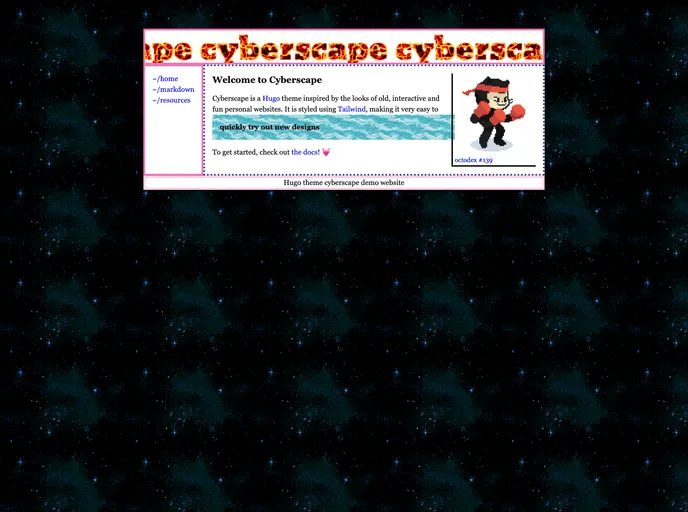
Overview:
Cyberscape is a lively and engaging Hugo theme designed for creating personal websites. It is perfect for individuals who enjoy the process of building their own websites.
Features:
- Vibrant design: Cyberscape offers a lively and engaging design to make your personal website stand out.
- Easy installation: Getting started with Cyberscape is as simple as using a command and changing the theme in the configuration file.
- Tailwind CSS integration: The theme uses Tailwind CSS for styling, allowing you to easily customize and update the styles of your website.
- Contributor-friendly: You are encouraged to contribute to the theme and make it even better.
- MIT License: Cyberscape is released under the MIT License, giving you the freedom to use, modify, and distribute the theme.
Installation:
To install Cyberscape, follow these steps:
- Use the following command to get started:
<command>
Open the
hugo.tomlfile and change the theme to “cyberscape”.Navigate to the themes directory and install the dependencies.
A Note on Tailwind: Cyberscape utilizes Tailwind CSS for styling. To ensure that your styles are up to date during development, you can run the following command from the themes directory:
<command>
If you wish to write Tailwind CSS in additional directories, you can add their relative path from the config file to the content field in the tailwind.config.js file.
Summary:
Cyberscape is a vibrant and engaging Hugo theme designed for creating personal websites. It offers an easy installation process, integration with Tailwind CSS for styling, and encourages contributions from users. With a MIT License, you have the freedom to use, modify, and distribute the theme to suit your needs.































