



 Github Stars:
 Last Commit:
  Created:
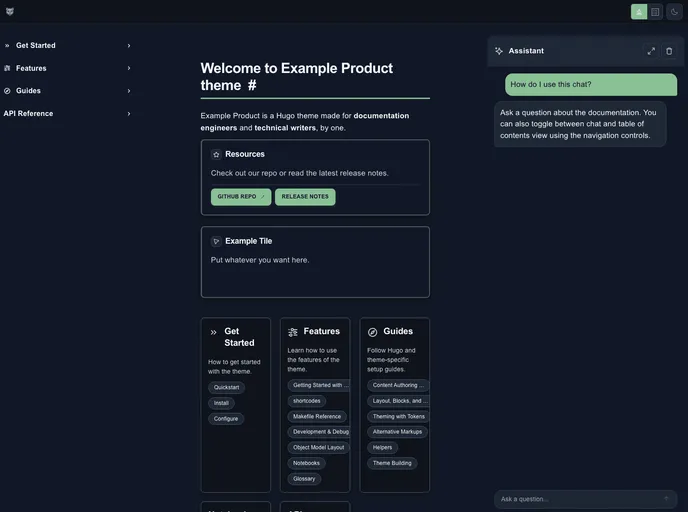
Overview
MiloDocs is a theme that provides a native chat feature and a GPT UI. It also includes a native algolia UI for enhanced search functionality. This product analysis will provide an overview of the theme’s key features, installation guide, and a summary of the content.
Features
- Native Chat: MiloDocs includes a built-in chat feature that allows users to communicate within the platform.
- GPT UI: The theme provides a user interface powered by GPT (Generative Pre-trained Transformer) technology for enhanced user interactions.
- Native Algolia UI: MiloDocs offers a native algolia UI, improving the search functionality and making it easier for users to find relevant information.
Installation
To install the MiloDocs theme, follow these steps:
Quickstart (MacOS)
- Copy and paste the following command into your terminal:
Open localhost:1313
- Getting started with the theme takes approximately 5 minutes.
1. Install Hugo
- See Hugo Docs for more installation options based on your operating system (MacOS, Linux, Windows).
2. Create a New Site
- Open your
<siteName>project directory. - Navigate to the themes/ directory.
3. Install This Project
- Run the following command: [command here].
4. Add Theme to Config
- [Instructions on how to add the theme to the configuration file].
5. Init Repo
- Add a comment.
- Push your new site and theme to your remote git repository.
6. Deploy locally
- Navigate into the
<siteName>repo. - Run the command to open localhost (typically localhost:1313).
Summary
MiloDocs is a theme that offers a native chat feature, a GPT user interface, and a native Algolia user interface for improved search functionality. This product analysis provided an overview of its key features, installation instructions, and a summary of the content.































